🎯 Overview
The Diagram View plots scheduled trains as a time–location chart: rows represent stations, platforms, and pull-out tracks, and the horizontal axis is time. It gives you a bird's-eye view of when and where each train arrives or departs — useful for tracking turnaround services and through-running trains.
🪟 Opening & Closing
Toggle the diagram panel using either of the following:
| Input | Action |
|---|---|
| F1 key | Toggle the panel on and off |
| "Diagram" button at the top of the screen | Toggle the panel on and off |
🖥 Reading the Panel
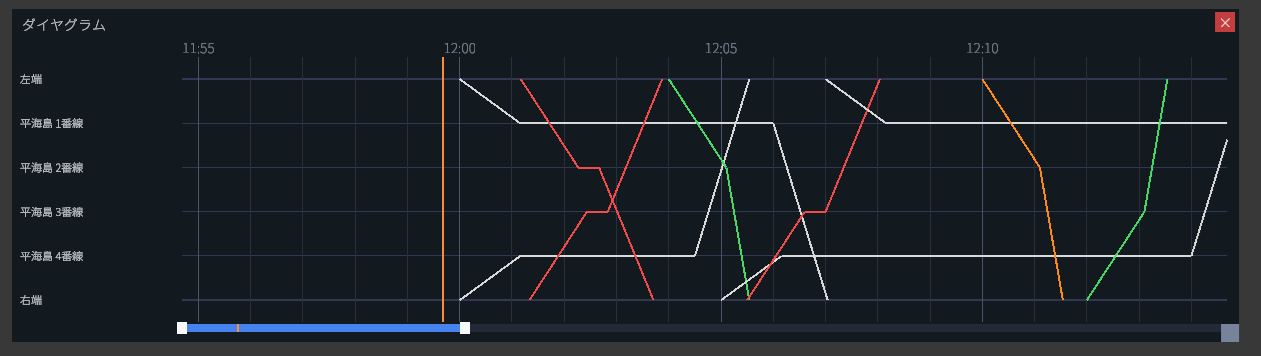
Vertical axis (row labels)
Each row corresponds to a station, platform, pull-out track, or terminus on the active map.
Horizontal axis (time)
The time ruler sits at the top of the panel. Thin tick marks appear every minute, with thicker vertical lines every five minutes to make the scale easy to read.
Current-time line
The orange vertical line marks the current scenario time. Normally it stays near the middle of the panel, and the diagram lines drift from left to right as time advances.
🎨 Line Colors by Train Class
Each diagram line is coloured according to the train's class.
| Class | Color |
|---|---|
| Local | White |
| Express | Blue |
| Limited Express | Red |
| Rapid Limited Express | Green |
| Airport Rapid Limited | Orange |
| Liner | Purple |
| Out-of-service | Gray |
↔ Scrolling
To inspect past or future times, use the following inputs on the panel:
| Input | Action |
|---|---|
| Click and drag horizontally | Scroll the time axis forward or backward |
| Mouse wheel | Scroll the time axis forward or backward |
| Right-click on the panel | Snap back to live (current-time) mode |
Live mode vs. scroll mode
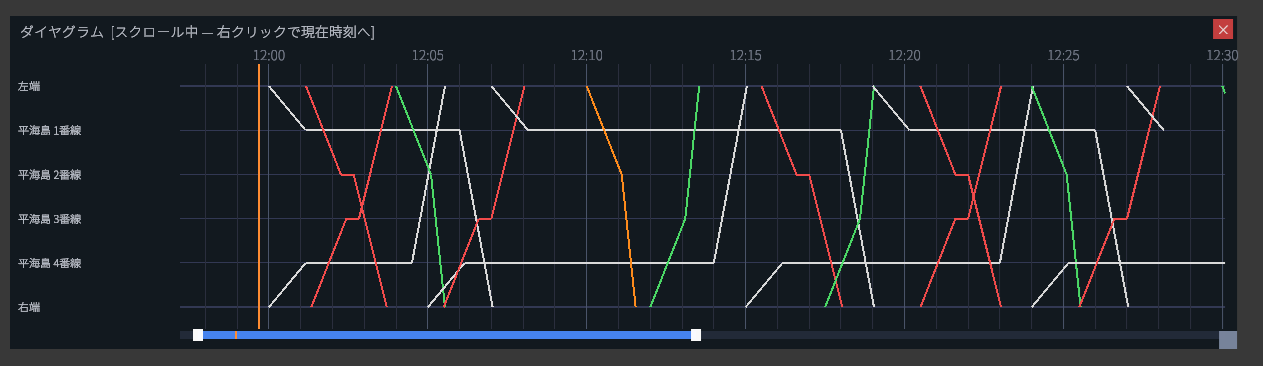
The panel header tells you which mode you are in.
| State | Header |
|---|---|
| Following current time | Diagram |
| Scrolled away from current time | Diagram [Scrolling — right-click to return to now] |
⚠ Notes
The lines on the diagram come from the scenario's planned timetable. Real-world deviations — delays, signal violations, mis-handled stops — are not reflected here. Check live train positions on the main map.