🎯 Map Overview
Keihin-Ohta is a key junction station where the Main Line and the Airport Line diverge, with six platforms (Tracks 1–6). Trains running up and down the Main Line, trains through-running from the Main Line onto the Airport Line, trains coming from the Airport Line onto the Main Line, and trains that turn around at the station are all mixed together — making this the map where route-building matters most.
- Tracks: Track 1 (Airport Line) / Tracks 2–3 (Main Outbound) / Track 4 (Airport Line) / Tracks 5–6 (Main Inbound)
- Directions: Main Line Outbound · Main Line Inbound · Airport Line
- Turnaround: Yes (Main Line ⇔ Airport Line turnarounds)
- Coupling / Merging: None (no coupling operations occur on this map)
🗺 Lever Layout
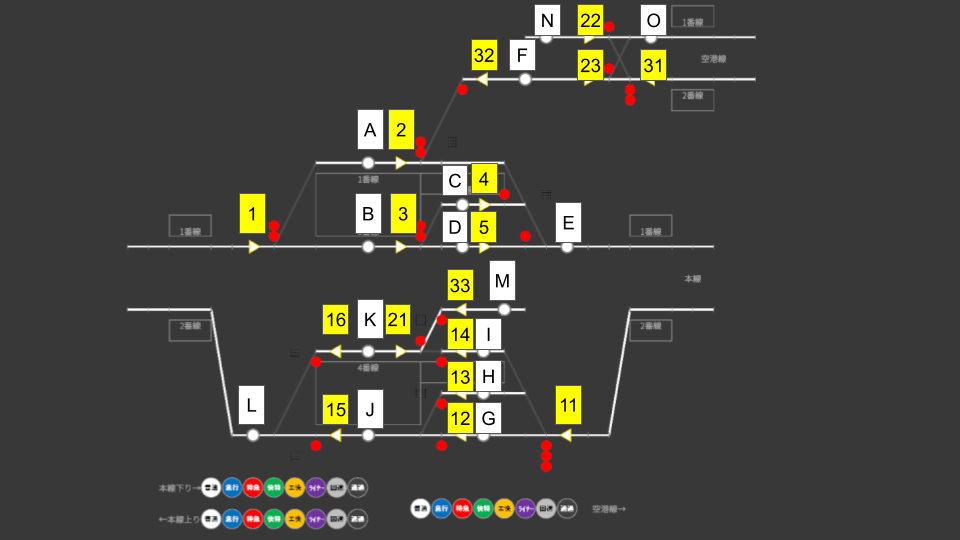
Use the diagram above to see how Start Levers, End Levers, and tracks are arranged in the station. A route is set by combining a Start Lever and an End Lever (e.g. route 1B is set with Start Lever "1" and End Lever "B").
🔀 Routes by Direction
At Keihin-Ohta, the route you use is determined by where a train comes from, which track it enters, and which direction it departs toward. The list below covers the eight basic patterns of this map. Learn the arrival and departure routes as a set.
Outbound Main Line Outbound (Left → Right)
| Pattern | Track | Arrival | Departure | Notes |
|---|---|---|---|---|
| Outbound (pass / stop) | Track 3 | 1B | 3D + 5E | The basic straight-through route for the Outbound line. Express-class trains also use this track. |
| Outbound (Track 2 refuge) | Track 2 | 1B + 3C | 4E | Where a local train waits to be overtaken. 1B brings it toward Track 3, then 3C diverts it into Track 2. |
| Outbound → Airport through | Track 1 | 1A | 2F + 23O | Enters from the Outbound line and continues straight onto the Airport Line. |
Inbound Main Line Inbound (Right → Left)
| Pattern | Track | Arrival | Departure | Notes |
|---|---|---|---|---|
| Inbound (pass / stop) | Track 6 | 11G + 12J | 15L | The basic straight-through route for the Inbound line. Express-class trains also use this track. |
| Inbound (Track 5 refuge) | Track 5 | 11H | 13J + 15L | Where a local train waits to be overtaken by a following limited-stop train. |
| Airport → Main Inbound through | Track 4 | 31N + 33K | 16L | Enters from the Airport Line and continues straight onto the Inbound line. |
Turnaround Trains that reverse at the station
| Pattern | Track | Arrival | Departure | Notes |
|---|---|---|---|---|
| Main Inbound → turn → Airport | Track 4 | 11I + 14K | 21M + 22O | Arrives on the Inbound line → reverses → departs onto the Airport Line. |
| Airport → turn → Main Outbound | Track 1 | 31F + 32A | 2E | Arrives from the Airport Line → reverses → departs onto the Outbound line. |
・Track 1 = Airport Line (Outbound ⇔ Airport through / turnaround from airport to outbound)
・Track 2 = Outbound refuge
・Track 3 = Outbound main (pass / stop)
・Track 4 = Airport Line (Inbound ⇔ Airport through / turnaround from inbound to airport)
・Track 5 = Inbound refuge
・Track 6 = Inbound main (pass / stop)
🔔 The Three Departure Boards
Keihin-Ohta's departure buttons are split into three boards by destination direction. Pick the board based on where the train you want to dispatch is headed.
| Departure board | Track → Direction | Platform-exit route |
|---|---|---|
| Outbound | Tracks 1・2・3 → Outbound line | 2E (Tk1) / 4E (Tk2) / 3D (Tk3) |
| Inbound | Tracks 4・5・6 → Inbound line | 16L (Tk4) / 13J (Tk5) / 15L (Tk6) |
| Airport | Tracks 1・4 → Airport line | 2F (Tk1) / 21M (Tk4) |
⏱ Refuge Operations (Morning Rush)
During the morning rush, local trains are overtaken by following limited-stop trains, so instead of the main tracks (Track 3 / Track 6) they enter the refuge tracks.
| Direction | Refuge track | Approx. start time |
|---|---|---|
| Inbound locals | Track 5 | roughly from ~7:20 |
| Outbound locals | Track 2 | roughly from ~7:37 |
🔄 Turnaround Procedure
A turnaround at Keihin-Ohta means a train reverses direction right at the platform it arrived on and continues in service as the next leg. No siding is used — the train reverses on the platform track. There are two types of turnaround:
- Track 1: arrives from the Airport Line → reverses → departs onto the Outbound line
- Track 4: arrives on the Inbound line → reverses → departs onto the Airport Line
Turnarounds here are not deadhead (non-revenue) moves. The same train handles both "arriving leg → its turnaround leg", and the turnaround leg is tracked with a "_2" suffix on the operation number (e.g. arrives as 641T → departs as 641T_2). Use the departure board to keep the pairs straight.
🔢 Procedure
-
Set the arrival route
Bring the turning train into the turnaround track. For Track 1, set the Airport-Line arrival route 31F + 32A; for Track 4, set the Inbound arrival route 11I + 14K (both together).
-
Wait for arrival and reversal
The train stops at the track and, when it reverses, it switches to the continuing turnaround leg (the operation with the "_2" suffix). Check the departure board for the departure time and direction.
-
Set the departure route
Set the departure route toward the post-turnaround direction. Track 1 → Outbound uses 2E; Track 4 → Airport uses 21M + 22O.
-
Press the departure button
Press the departure button on the board for the post-turnaround direction (the "Outbound" board for outbound, the "Airport" board for the Airport Line). The train departs at its scheduled time.
⚠ Common Mistakes & Cautions
① Picking the wrong direction (departure board)
Tracks 1 and 4 can depart toward more than one direction. Before dispatching, confirm you've selected the board for the direction the train will head after turning around.
② Forgetting to route locals into the refuge tracks
If you put a morning-rush local (Inbound from ~7:20 / Outbound from ~7:37) onto the main tracks (Track 3 / Track 6), the following limited-stop trains back up. Send locals to the refuge tracks (Track 2 / Track 5).
③ Mixing up turnaround trains
In a turnaround, the arriving leg and its turnaround leg (the operation with a "_2" suffix, e.g. 641T → 641T_2) are the same train — it is not a deadhead move. Use the departure board to match the arriving number with its turnaround number, so you don't confuse it with another train.